You click into a SQL execution in the Spark Web UI. You want to know: which jobs did this query launch, how far along are they, and did anything fail?
Here’s what the page used to show you:
Running Jobs: 0, 1, 2
Succeeded Jobs: 3, 4
That’s it. Bare IDs. No status, no duration, no stage counts, no progress bars. To understand what was actually happening, you had to click each job ID, inspect the job detail page, navigate back, click the next one, and mentally assemble the picture. For a complex query that spawns a dozen jobs, this was a real pain.
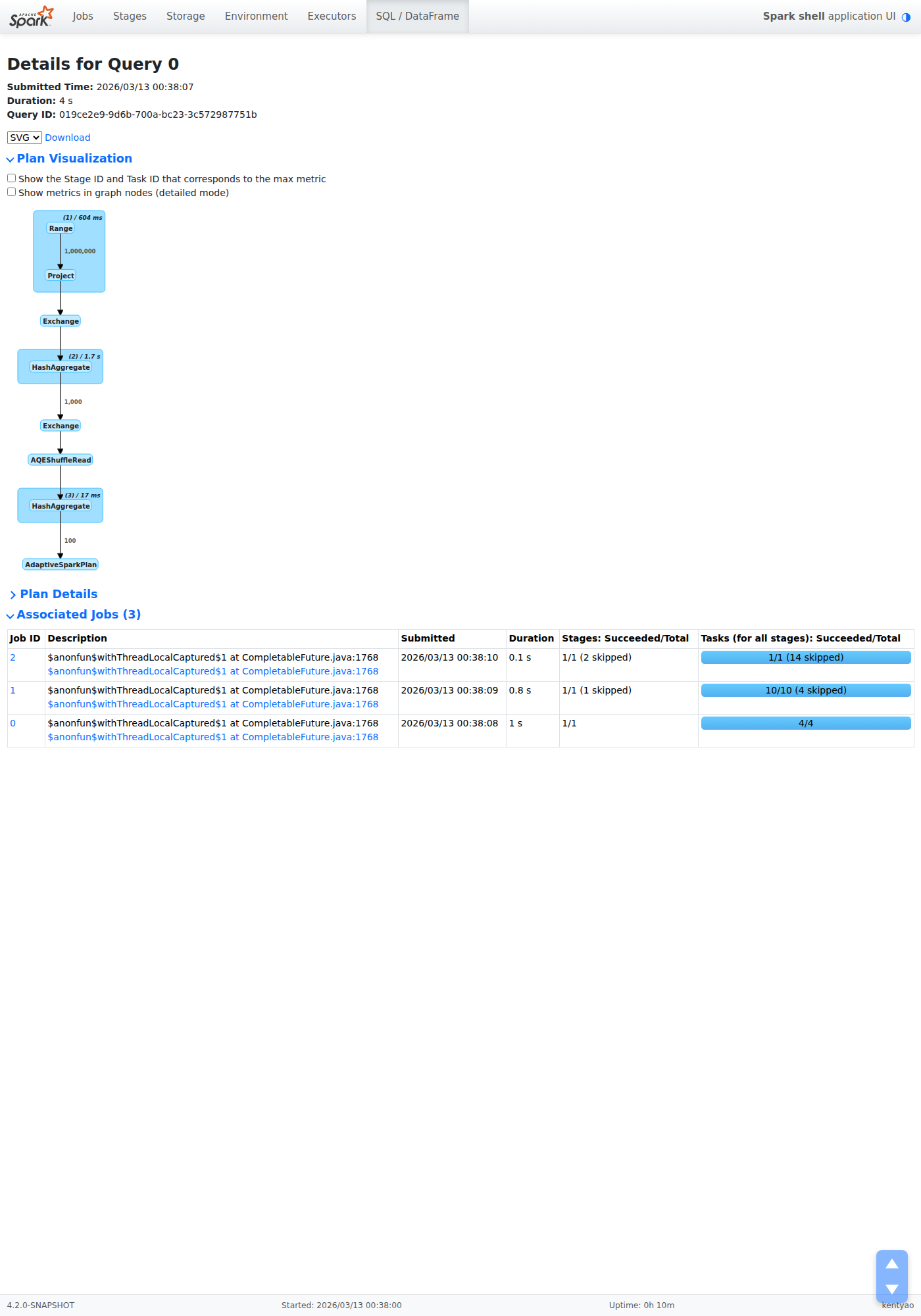
SPARK-55971 fixes this. The SQL execution detail page now has a full Associated Jobs table that shows everything at a glance.
What It Looks Like
Here’s the new jobs table on a succeeded execution:

And here’s a failed execution with killed tasks — notice the concise progress bar labels:

The full page showing where the jobs table sits — right below Plan Details:
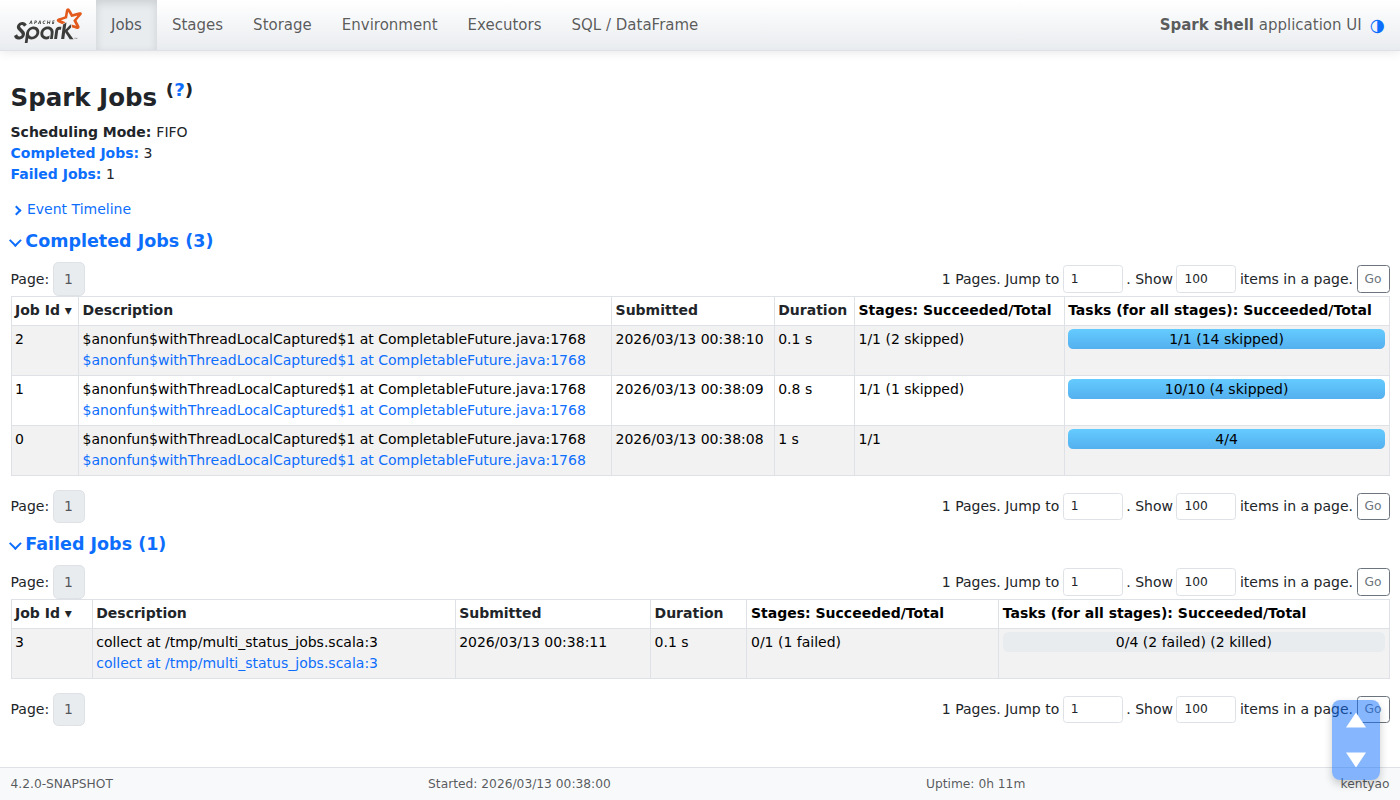
For comparison, here’s the Jobs page — the new table follows the same visual style:
What the Table Shows
| Column | What It Shows |
|---|---|
| Job ID | Link to the job detail page |
| Description | Stage name and description |
| Submitted | Submission timestamp (sortable) |
| Duration | Human-readable duration (sortable) |
| Stages: Succeeded/Total | Stage completion with failed/skipped counts |
| Tasks: Succeeded/Total | Progress bar with task-level breakdown |
The table header shows “Associated Jobs (N)” so you immediately know how many jobs the query spawned. Click the header to collapse or expand the section — the state persists across page reloads via localStorage.
Columns are sortable. Click Duration to find the slowest job. Click Submitted to see execution order. The Stages and Tasks columns use the same progress bar style as the main Jobs page, keeping the visual language consistent.
Why This Matters
The SQL execution detail page is where engineers go when a query is slow or failing. The questions are always the same:
- How many jobs did this query create? — Now visible in the section header.
- Which job is the bottleneck? — Sort by Duration.
- Are jobs still running? How far along? — Task progress bars show this instantly.
- Did any stages fail? — The Stages column shows failed/skipped counts inline.
- What’s each job actually doing? — The Description column shows stage names.
Previously, answering any of these required navigating away from the execution page. Now they’re all answered in one table, on the same page, without a single click.
Bonus: Concise Progress Bar Labels
The same PR also fixes a long-standing readability issue with progress bars across the entire Web UI. When tasks are killed, Spark used to display the full kill reason — including stack traces — inside the progress bar label:
[====>    ] 45/100 (5 killed: org.apache.spark.SparkException: Job 3 cancelled
because SparkContext was shut down at org.apache.spark.scheduler.DAGScheduler...)
Now it shows a concise label with the detail available on hover:
[====>    ] 45/100 (5 killed)
                    ↑ hover for full reason
This applies to progress bars on the Jobs page, Stages page, and the new SQL execution jobs table. The truncated reason (up to 120 characters) is kept in the tooltip.
Part of a Bigger Modernization
This is one piece of the broader SPARK-55760 Web UI modernization. Other recent improvements include:
- Dark mode — one-click toggle, OS preference detection (SPARK-55766)
- Compact SQL plan visualization — edge row counts, clickable metric panels (SPARK-55785)
- Offcanvas detail panels — slide-out executor views (SPARK-55767)
- Bootstrap 5 Collapse API — replacing custom JS collapse across all pages (SPARK-55773)
- Bootstrap 5 migration — from 4.6.2 to 5.3.8 (SPARK-55761)
The goal is simple: the Spark Web UI should be as good at helping you understand your queries as Spark is at running them.
Try It Out
This feature is already merged to master and will be available in the next Apache Spark release. If you’re building from source, try it today.
Contributed as SPARK-55971 (PR #54768). Feedback and contributions to the Spark Web UI modernization are welcome at SPARK-55760.